
Lynch On Life
A full walkthrough of the device and app, with a side-by-side on how it compares to Brick on mechanics and price.
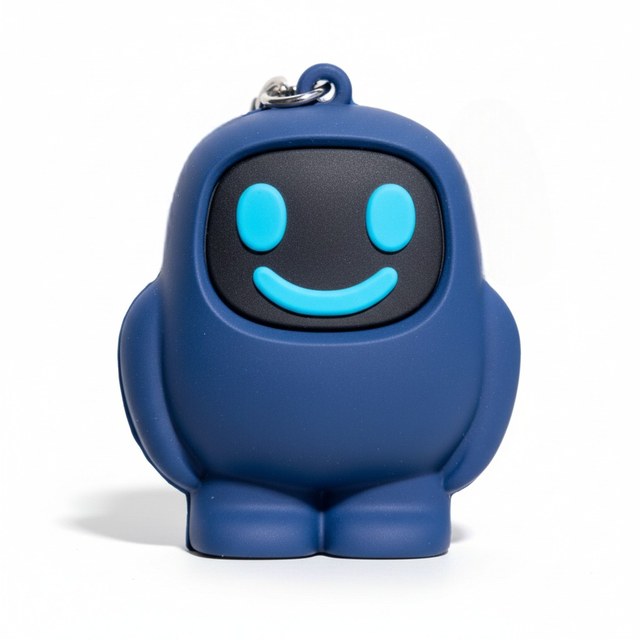
Watch the reviewScrolly is a small tag plus a companion app. You tap your phone against the tag to block the apps that eat your evening, and tap it again to get them back. This page collects the reviews, the comparisons and the buyer feedback, with a link to every original source.
Unboxings, week-long tests and verdicts. Each card links to the original.
Lynch On Life
A full walkthrough of the device and app, with a side-by-side on how it compares to Brick on mechanics and price.
Watch the review


Drew Hines
A direct comparison with Brick, including a section on where Scrolly falls short.
Watch the review
Dumb Phones UK
An unboxing and first impressions from a dumbphone channel, framed as a first look rather than a long-term verdict.
Watch the reviewArticles and write-ups, with a line on where each one lands.
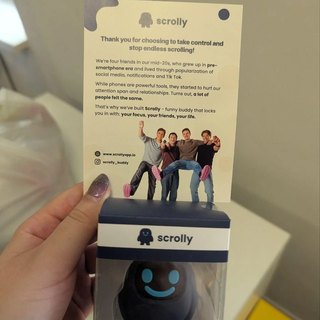
A thread in a digital-minimalism community on what living with a physical app blocker is like.
r/digitalminimalism
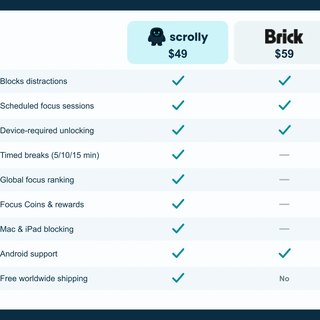
A feature-by-feature comparison with Brick: price, timed breaks, Mac and iPad blocking, and what each one needs to unlock.
 Scrolly
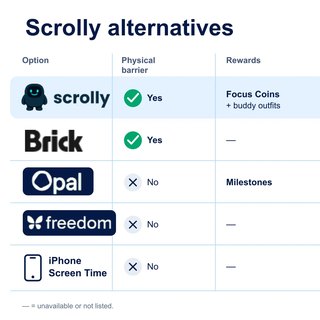
Scrolly set against Brick, Opal, Freedom and iPhone Screen Time on the physical barrier, rewards, leaderboards and price.
Scrolly

 Anna DVerified buyer
I love how it works and it helps to keep me focused
 Magdalena SVerified buyer
Absolutely great experience and huge help in limiting doomscrolling! I'm impressed and super happy I got my Scrolly!
 Miguel LVerified buyer
This is just what I needed to stop searching up social media websites on safari and using them that way even though I deleted the apps long ago. The regular screen time blocker on my iPhone wasn't enough bc I would just over ride it but this is a physical barrier and has worked great! I keep it engaged 24/7.
 Michael CVerified buyer
Adding just the one little step of having an external “key” to unlock time wasting apps for pre-set intervals of time is an absolute game-changer! The Scrolly buddy is adorable and durable, and it makes so much sense to make a one-time purchase to have access to the awesome app. Excellent product!
 UVerified buyer
Honestly a super easy to use and effective device. OFC motivation is still needed, but having the physical device and a motivating app helped me reduce my screen time from 5 hours to less than 3.
 Beth FVerified buyer
I am on my phone much less! No complicated instal or app. So simple

Actually fixed my doom scrolling
Reviewed in the United States on 7 October 2026
Color: PinkVerified Purchase
I was spending hours doom scrolling and feeling awful afterward. I didn't want to delete my Facebook and Instagram since they're part of my business, so this was the answer. You tap Scrolly on your phone and it blocks whatever apps you choose. I blocked my social media and games. It's fully customizable, and you can even set schedules. The gamification got me. You earn focus coins and buy Scrolly little outfits (I want the hat). There's also a worldwide ranking and stats. I'm on a 5-day streak with 28 hours of focus time. That's 28 hours I would've spent scrolling. It's cute, it's simple, and the physical tap on your phone really works. Note: you do need the physical key (Scrolly) plus the app, the app alone won't work. Highly recommend, especially if you're an entrepreneur and your phone is also your work.
Meet the Gadget That Keeps Me Off Social Media
Reviewed in the United States on 6 August 2026
Color: Dark BlueVerified Purchase
I really like the idea behind this product. Setup was quick and straightforward, and the app was easy to connect. The Scrolly device is compact, lightweight, and easy to carry or leave somewhere when you want fewer distractions. What makes it different is that you need the physical device to unlock the apps you've chosen, which adds an extra step before you can start scrolling. It's a clever concept for anyone trying to be more intentional with their screen time. Overall, it seems well designed, easy to use, and a creative approach to reducing distractions. If you're looking for help cutting back on mindless scrolling, this is definitely worth checking out.
A game changer for screen time reduction
Reviewed in the United States on 31 May 2026
Color: Dark BlueVerified Purchase
I was skeptical at first, but this product has genuinely changed my relationship with the phone. The setup couldn't be easier - it worked right out of the box, and I was using it within minutes. Build quality of the device is super solid and the app itself offers very intuitive UX. What surprised me most though, is how effective a simple physical barrier can be. I've tried various apps and digital tools to reduce screen time, but none of them had the same impact. Having that extra step between me and my phone makes all the difference. Since I started using it, I've significantly reduced my phone usage (daily screen time was down by 2hrs in the first week already) and become much more intentional about when I pick it up. It's simple, practical, and incredibly effective. If you're serious about cutting down on mindless scrolling and building healthier habits, I highly recommend it.
Great for cutting the cellphone addiction cord
Reviewed in the United States on 3 September 2026
Color: Dark BlueVerified Purchase
Gives me back my time - I am glad this doesn't require a subscription to use for my iPhone (subscription if you need to use on your iPad or Mac is an option currently) and it helps to reduce my doom scrolling/time wasting on my phone so it feels like a good price for what it gives me. I hate the subscription based apps on the phone that do similar things and the built in screentime timer is too easy to tap ignore on. It's small enough to fit on my keychain or in my backpack and in theory I shouldn't lose it although I am worried that it might break off the keychain links in the future. It might be night if it were on a carabiner type clip so I could easily take it off my keychain if I wanted to put it somewhere else. I hope it holds up in the long run to normal use. I appreciate that it's portable rather than other options which are limited to the one location you stick them to. I would wholeheartedly recommend this to anyone who's seeking a break from their doom scrolling days or wants to break their phone addiction.
Helps you stay focused during work, studying, or family time.
Reviewed in the United States on 4 October 2026
Color: PinkVerified Purchase
I really like this phone blocker! It's simple to use and helps me stay off my phone when I need to focus. I love that there's no subscription, and it's a great tool for reducing screen time and being more productive. Definitely recommend!
Seeing results after only a couple days
Reviewed in the United States on 10 July 2026
Color: Dark BlueVerified Purchase
I can already see the results after only using it a couple days. I think this is a great tool when going through admin or less interesting work phases and would be great for every job hunter or student who needs to dedicate time to succeed. It is easy to use, just make sure you remember where you left your scrolly, which is why the key chain is great so it stays with my house keys. I like that it also offers a short 5-15min pause in case you need to check something quickly. Gimmicky? Probably. Results? Certainly!
A small physical tag and a companion app: you tap your phone against the tag to block the apps you chose, and tap it again to unblock them.
The store lists a 90-day money-back guarantee, full refund.
Several of the videos above run that comparison directly, including one that covers where Scrolly falls short. Both are physical devices you tap; they differ on price, on how unblocking works and on what the app does around it.
Yes, if you decide to. It is built to break the automatic reach for an app, not to lock a phone down against its owner. The reviewers who report the biggest change are the ones who keep the tag somewhere inconvenient.
They are a mix. Some creators were sent a device and some use a referral link. Every card links to the original, so you can read or watch it in full and judge it yourself.
Scrolly costs $49.95 once. Phone blocking has no recurring fee. Mac and iPad blocking is a paid add-on. Full breakdown.
Scrolly setup takes a few minutes: install the app, pair it with the tag, choose which apps get blocked. Here is the whole sequence.
Scrolly's refund policy is a 90-day money-back guarantee with a full refund. What that covers and why the length matters for this product.
Lost Scrolly tags do not lock you out: there is an emergency unlock, the app runs on its own until you replace it, and spare tags are sold separately.
Scrolly blocks apps and sites on Mac and iPad as a paid add-on, separate from the phone blocking included with the tag.
Scrolly vs Brick is covered in two video reviews and a written feature-by-feature comparison. Here is where to find each one.
Scrolly Amazon reviews, what verified buyers consistently praise and complain about, and how buying on Amazon differs from buying direct.
Physical app blockers put an object between you and your apps instead of a button you can press. How they work, what exists, and what to look at before buying one.
Apps like Brick fall into two groups: other tap-to-unlock devices, and software-only blockers. What belongs in each, and where the comparisons live.